Filtering Options:
1 software:
-
 9 screenshots
 BaipixA free, open source pixel art editor in the browser, with layers, palettes, isometric tools and clean SVG export.Free1Pixel Art
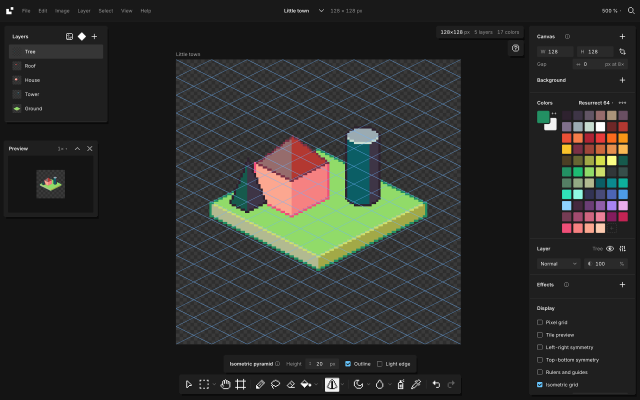
BaipixA free, open source pixel art editor in the browser, with layers, palettes, isometric tools and clean SVG export.Baipix is a pixel art editor that runs in the browser, with no account and no install. It is free and its source code is public under the MIT license. Drawings are saved in the browser, a deleted one waits in the trash, and files can be downloaded as .baipix. The interface is in English, French, Ukrainian, Spanish, Japanese, Italian, Korean and Brazilian Portuguese.
It covers the usual pixel art tools (pixel-perfect pencil with a stabilizer, shapes, paint bucket, gradient with dithering, lasso and magic wand selections, symmetry, a tile preview for seamless textures) along with layers, groups, blend modes, layer effects (outline, drop shadow, glow) and reusable components: a sprite drawn once can be placed on any board, and its copies follow it.
Animation: a timeline under the canvas, onion skin, a duration for each frame, and a preview that plays the loop. Animations export as GIF, PNG sequence, sprite sheet or .aseprite.
Palettes belong to each file: classic presets (many of them from Lospec, like Sweetie 16, Endesga 32, Resurrect 64 or Lospec500), the colors used in the drawing, palettes the user keeps, or .hex and .gpl files. Shade and lighten step along the palette's ramps, and Remap moves a whole drawing onto another palette. A reference image can sit under the drawing to trace over, and the eyedropper picks its colors.
For isometric work it has a 2:1 grid that tools snap to, 2:1 lines, box, cylinder and pyramid tools shaded from the palette, extrusion of flat shapes into volumes, shapes drawn on walls or on the ground, staggered tile previews and images laid onto a face. A file can hold several boards side by side.
Opens .baipix, .aseprite and image files. Exports: PNG at 1× to 32×, SVG with one path per color and the layers kept as groups, .aseprite files, GIF and sprite sheets, tilesets for game engines (PNG sheet with a Tiled tileset and map), and the drawing as code (React, CSS, JSON or ASCII).
It suits game artists making sprites, animations, tiles and isometric scenes, designers who need pixel icons, and people trying pixel art without installing anything. It works best with a mouse or trackpad; tablet support is in progress.
Docs: baipix.app/docs
Features:layerseffectspalette manipulationditheringtilesisometricaseprite exporttilemap exportanimationanimation previewonion skinninggif exportsprite sheet exportsprite sheetaseprite1 0 pieces
There are no more software for your current criteria.
There are no software for your current criteria.
Thanks for your feedback! If you want to say more, please post a Suggestion or Bug Report!
our next patreon goal: $350 / $500