Filtering Options:
7 software:
-
 12 screenshots
 BaipixA free, open source pixel art editor in the browser, with layers, palettes, isometric tools and clean SVG export.Free1Pixel Art
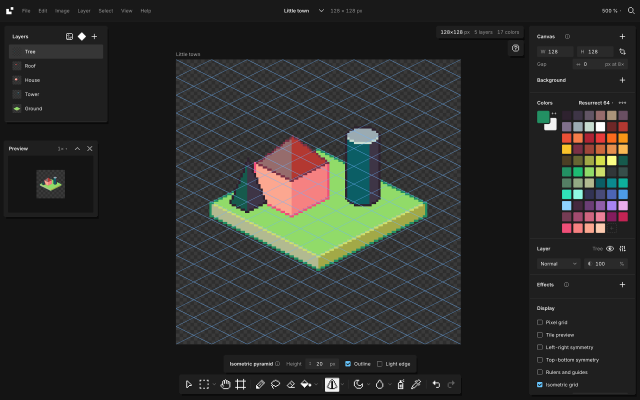
BaipixA free, open source pixel art editor in the browser, with layers, palettes, isometric tools and clean SVG export.Baipix is a pixel art editor that runs in the browser, with no account and no install. It is free and its source code is public under the MIT license. Drawings are saved in the browser, a deleted one waits in the trash, and files can be downloaded as .baipix. The interface is in English, French, Ukrainian, Spanish, Japanese, Italian, Korean and Brazilian Portuguese.
It covers the usual pixel art tools (pixel-perfect pencil with a stabilizer, shapes, paint bucket, gradient with dithering, lasso and magic wand selections, symmetry, a tile preview for seamless textures) along with layers, groups, blend modes, layer effects (outline, drop shadow, glow) and reusable components: a sprite drawn once can be placed on any board, and its copies follow it.
Animation: a timeline under the canvas, onion skin, a duration for each frame, and a preview that plays the loop. Animations export as GIF, PNG sequence, sprite sheet or .aseprite.
Palettes belong to each file: classic presets (many of them from Lospec, like Sweetie 16, Endesga 32, Resurrect 64 or Lospec500), the colors used in the drawing, palettes the user keeps, or .hex and .gpl files. Shade and lighten step along the palette's ramps, and Remap moves a whole drawing onto another palette. A reference image can sit under the drawing to trace over, and the eyedropper picks its colors.
For isometric work it has a 2:1 grid that tools snap to, 2:1 lines, box, cylinder and pyramid tools shaded from the palette, extrusion of flat shapes into volumes, shapes drawn on walls or on the ground, staggered tile previews and images laid onto a face. A file can hold several boards side by side.
Opens .baipix, .aseprite and image files. Exports: PNG at 1× to 32×, SVG with one path per color and the layers kept as groups, .aseprite files, GIF and sprite sheets, tilesets for game engines (PNG sheet with a Tiled tileset and map), and the drawing as code (React, CSS, JSON or ASCII).
It suits game artists making sprites, animations, tiles and isometric scenes, designers who need pixel icons, and people trying pixel art without installing anything. It works best with a mouse or trackpad; tablet support is in progress.
Docs: baipix.app/docs
Features:layerseffectspalette manipulationditheringtilesisometricaseprite exporttilemap exportanimationanimation previewonion skinninggif exportsprite sheet exportsprite sheetaseprite1 0 pieces -
 Make Sprite SheetA browser-based sprite sheet maker, splitter, and GIF converter for 2D pixel art.
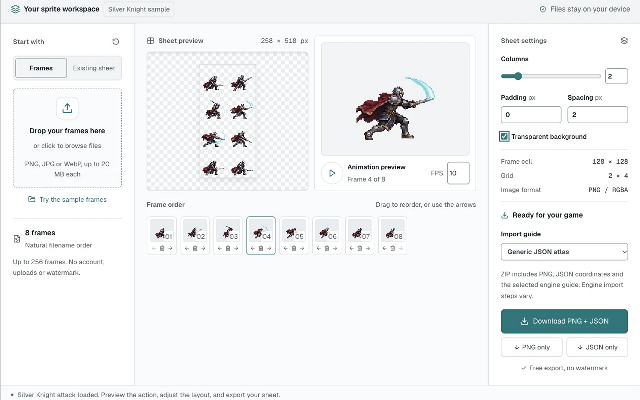
Make Sprite Sheet is a browser-based utility for assembling, splitting, and converting 2D sprite sheets locally without uploading files to a server.
It supports packing up to 256 PNG, WebP, or GIF frames (up to 20 MB per file) into a grid layout, adjusting columns, padding, and spacing, previewing frame-by-frame animations at custom FPS, and exporting a transparent PNG sprite sheet alongside a JSON atlas compatible with 2D game engines such as Godot, Unity, and Phaser. It also includes tools for converting animated GIFs into sprite sheets and splitting existing sprite sheets back into individual frames.
0 0 pieces -
 0 screenshotsPixel Character GeneratorBrowser tool that generates animated 32x32 pixel art characters and exports them as sprite sheets.Freemium0Pixel Art
Pixel Character GeneratorBrowser tool that generates animated 32x32 pixel art characters and exports them as sprite sheets.Pixel Character Generator is a browser tool that builds animated 32x32 pixel art characters for games. It has eight preset roles, such as knight, mage, rogue and archer, and options for body type, skin, hair, headgear, outfit, colours, cape, weapon and shield. A seed makes results repeatable, and a crowd button rolls twelve characters at once. Each character has idle, walk, attack, hurt, jump and die animations in a side view, plus front and back views. Shading uses hue-shifted colour ramps and a coloured outline. It exports a sprite sheet with JSON frame data. The free version allows three exports a day at 1x and 2x scale. The paid Pro plan adds 4x and 8x scale, a 4-direction top-down sheet, front and back frames, Godot 4 SpriteFrames files and crowd ZIPs. It is part of GameShipKit, a collection of browser tools for game developers.0 0 pieces
-
 0 screenshotsPixel Monster GeneratorBrowser tool that generates animated 32x32 pixel art monsters and exports them as sprite sheets.Freemium0Pixel Art
Pixel Monster GeneratorBrowser tool that generates animated 32x32 pixel art monsters and exports them as sprite sheets.Pixel Monster Generator is a browser tool that builds animated 32x32 pixel art enemies for games. It has nine monster types: slime, bat, ghost, floating eye, mushroom, spider, wisp, biting plant and rock golem. Each type has three body shapes, width and height sliders, colours, eye styles, patterns such as spots and stripes, and extras such as horns or a crown. A random button and a seed field make new monsters, and a horde button rolls twelve at once. Every monster has idle, move, attack, hurt and die animations on one sheet. It exports a sprite sheet with JSON frame data. The free version allows three exports a day at 1x and 2x scale. The paid Pro plan adds 4x and 8x scale, Godot 4 SpriteFrames files and horde ZIPs. It is part of GameShipKit, a collection of browser tools for game developers.0 0 pieces
-
 0 screenshotsPixel VFX StudioBrowser tool that generates 37 animated pixel art effects you can recolour and export as sprite sheets.Freemium0Pixel Art
Pixel VFX StudioBrowser tool that generates 37 animated pixel art effects you can recolour and export as sprite sheets.Pixel VFX Studio is a browser tool that draws animated pixel art effects with code. It includes 37 effects in ten groups: fire, explosions, impacts, magic, ice, lightning, water, nature, weather and pickups. Loops such as torches, portals and rain wrap without a seam. One-shots such as explosions and slashes start and end on an empty frame. Each effect uses a ramp of six colours, so it can be recoloured with a preset palette or with custom colours. Size, frame count, speed and random seed can be changed. Optional dithering and a dark outline are available. It exports a sprite sheet with JSON frame data or a GIF. The free version allows three exports a day at 1x and 2x scale. The paid Pro plan adds 4x and 8x scale, Godot 4 SpriteFrames files, single frame PNGs and category ZIPs. It is part of GameShipKit, a collection of browser tools for game developers.0 0 pieces
-
0 screenshotsSpriteLatheBuilds a small 3D model from front, side and top pixel-art views and draws it as an 8- or 16-direction sprite sheet.Paid0Pixel Art
 SpriteLatheBuilds a small 3D model from front, side and top pixel-art views and draws it as an 8- or 16-direction sprite sheet.
SpriteLathe builds a small voxel model from the views you draw (front, side and top, plus the back and the other side if you have them) and draws it from every angle as one sprite sheet.
It has two build modes. ROUND is for props: each height level follows the top view's outline, scaled to that row of the front and side views, so pots, barrels and columns stay round from every angle. CARVE is for characters and boxy objects: it keeps the voxels where all your views agree.
The export is a PNG sheet of 8 or 16 equal frames in one row, with the empty pixels kept so every frame lines up, plus a JSON file with the frame size and each frame's angle. Options: a camera angle from 0 to 60 degrees, an optional 1 px outline in the darkest colour, and export scale 1x to 8x. Only colours from your drawings are used, and no shading is added.
It runs offline as a single HTML file in a desktop browser (Chrome, Edge, Firefox or Safari), and nothing is uploaded.
Limits: one pose per sheet (no animation frames). In ROUND mode, handles and spouts become a ring around the body. Details drawn only on the front show from every side. In CARVE mode, a part drawn in only one view can come back trimmed.
The code was written with an AI assistant. The tool doesn't use AI on images: the 3D shape comes from your pixels by geometry.
Features:8 directions16 directionssprite sheetvoxel modelround modeoutlinepalette preservingjson export0 0 pieces -
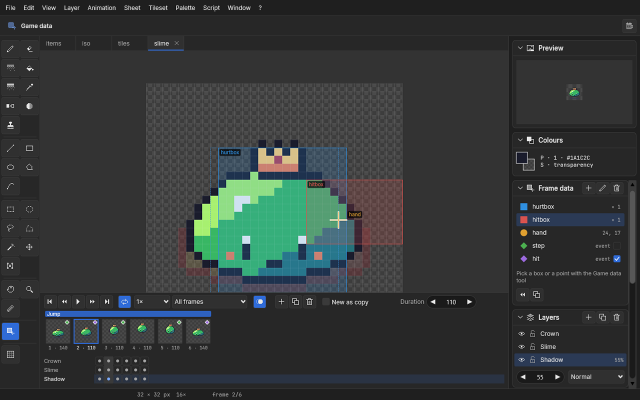
 SpriteriaIndexed-palette pixel art editor for sprites, animations, spritesheets and tilesets, with game engine exports.Spriteria is a desktop pixel art editor for Windows that works with a true indexed palette: every pixel is a palette index, so changing a colour changes it everywhere. All drawing tools use their own pixel-exact algorithms with no antialiasing.
Features include layers, animation with frame durations and tags, onion skin, hand-drawn spritesheets, 4/8-direction sprites with derived mirrored directions, hand-drawn normal maps, nine-slice, bitmap fonts, palette variants and historical palette presets (Game Boy, NES, C64, PICO-8 and others), an isometric mode with grids and snapping, and tilesets with terrains, autotiling (corners, sides, blob 47), a tile generator, collisions and a test map.
Export formats: PNG spritesheets with Aseprite-style JSON, GIF, PNG sequences, Godot 4 SpriteFrames and TileSets, Tiled, LDtk, Aseprite files, BMFont, and Unity and GameMaker via Lua scripts. Exports can run automatically on every save, and a command-line exporter is included.
The program is free, has no ads or account, collects no data and works offline. The interface is available in English, Italian, French, Spanish and German.
0 0 pieces
There are no more software for your current criteria.
There are no software for your current criteria.
Thanks for your feedback! If you want to say more, please post a Suggestion or Bug Report!
our next patreon goal: $351 / $500